
It does not type your password
You enter your password in the destination website’s real window, without handing it to the Agent.
Windows · Fingerprint Chromium and Dovra 1.0 portable · Codex and Claude
Every Codex or Claude project session gets its own window and target while reusing a persistent environment you already signed in to. Passwords, CAPTCHA, and account switching stop and return control to a person.
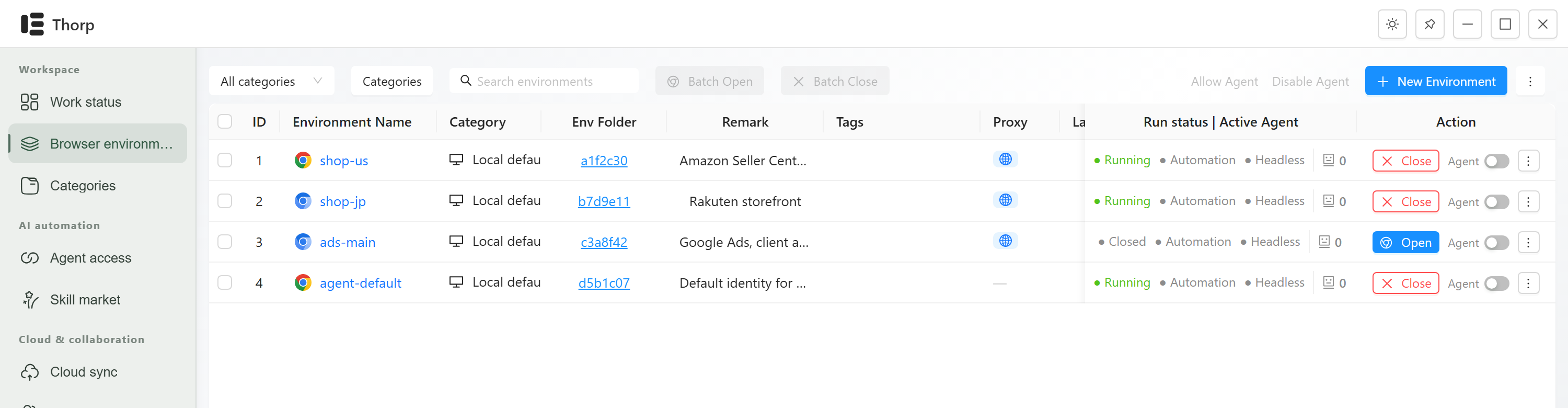
The environment holds the login; a session owns only its own window. The four statements below are behaviour you can check in the software, not slogans.
You enter your password in the destination website’s real window, without giving it to the Agent.
Cookies, login state, proxy and extensions all live in that persistent folder.
Local environments have no count cap. Cloud environment slots and team members expand independently.
New environments stay local. Choosing a cloud category enables encrypted sync.
Put plainly: the environment-routing layer your automation is missing. Persistent environments hold login state; temporary MCP sessions own only their windows. One agent can use several environments, and several agents can share one without fighting over a tab.
Agents can already click pages. The recurring failures are profile locks, target cross-talk, and work continuing under the wrong login premise. Every report below is public.
The upstream docs say it plainly: one persistent profile, one browser instance at a time. Concurrent callers must share that process with explicit target ownership, or use temporary isolation that throws the login away.
microsoft/playwright-mcp docsParallel agents end up driving the same tab, so their results contaminate each other.
microsoft/playwright-mcp #893An agent routes to the wrong browser environment and runs while signed out, which changes what the task means.
NousResearch/hermes-agent #44499A Windows user deletes profile directories, kills Chrome and reboots, and still cannot run two sessions.
microsoft/playwright-mcp #752A browser environment is one persistent profile: cookies, login state, proxy, and extensions live there. An agent session is one temporary MCP process that owns only the window and target it created.
Windows in the same environment share login state. Navigation, screenshots, clicks, typing, and close operations stay bound to their own targets.
Ordinary MCP calls expose only a target-scoped WebSocket. The environment-wide CDP endpoint is reserved for an explicit human debugging request.
The clock and the location are not saved either. They are read from the IP you are coming out of, every time a window opens, so an account never turns up with a US address and a Tokyo clock.
Codex · project-a
  development → window 1842 / target A
  search      → window 1845 / target B

Claude · project-b
  development → window 1851 / target C

same development profile:
shared login, separate page controlConnect Codex / Claude The desktop installs Skill and MCP atomically and restores the original files if the real handshake fails.
thorp create browser1fordev --group project1 --tag development A new environment is created only after explicit approval. Passwords and checks requiring your presence are handed back to you.
.thorp/browser-environments.local.json The project stores only stable environment IDs and purpose metadata, never cookies or tokens.
Windows and WSL2 both start the stable Windows CLI over stdio. The desktop window does not need to stay open.
Codex and Claude Code are officially supported. A connection transaction changes only Thorp's Skill directory and MCP entry, preserving every unrelated configuration.
Sharing login state does not turn window separation into account isolation. Sign-out, cookie clearing, and environment deletion remain explicit human actions.
$ thorp list --group project1       # inventory real environments first
$ thorp create browser1fordev \
    --group project1 --tag development  # only after explicit approval

MCP browser_open id=12             # this session's owned window
MCP browser_windows # lists only its own windowsTraditional multi-profile and antidetect-browser workflows remain compatible, but V2 is about deterministic selection, reuse, and target ownership for agents, not the number of browser windows a person can open.
| Dimension | Separate Chrome profiles | Antidetect browsers | Cloud browser services | Thorp |
|---|---|---|---|---|
| Concurrent agents | One profile, one process lock. You still have to build target ownership and reuse. | Yes. This is the thing they are built for. | Yes, on someone else’s machine. | One process and login state per environment; one owned window and target per MCP session. |
| Where the login lives | Your disk, mixed in with your daily browsing. | Your disk on local plans, their cloud on the sync plans. | The provider’s infrastructure. | Your disk, one persistent profile per browser environment. |
| Proxy and timezone | Shared with everything else in that browser. | Per profile, and they have years of practice at it. | Per session, chosen by the provider. | Per environment. Timezone and coordinates read from the exit IP at launch. |
| Agent access | You wire up CDP flags yourself and keep them working. | A REST API on the paid tiers. Nothing to install into your agent. | Provider API, provider quota. | One Codex/Claude Skill protocol; ordinary calls receive only their target-scoped WebSocket. |
| What you pay for | Nothing, until the maintenance lands on you. | Profile count, then seats, then automation as an add-on. The sticker price is the starting point. | Metered minutes, whether the run succeeded or not. | Local environments have no count cap. Cloud environments, team members and add-ons have explicit prices; payment requires confirmation. |
You enter your password in the destination website’s real window, without handing it to the Agent.
When a page wants a human, the run stops, the window stays open on that page, and Thorp pings you. Waiting for a person is a normal state here, not a crash.
It keeps each environment consistent with itself: language, clock and location match the exit IP. Nobody can promise a platform will never flag an account, so we do not.
New environments stay local by default. Choosing a cloud category syncs necessary browser data in encrypted form. See the Privacy Policy for how connected external Agents may process page content.
Auto-update is off by default, and any release that changes how your environments behave says so in the release notes. A silent change across long-lived profiles can put every account at risk at once.
A running environment is still a browser process. Windows in one environment reuse it; concurrency across environments is ultimately bounded by machine memory.
Thorp does not create an agent roster for you to maintain, and it never signs in for you. Local agents can discover environments; project maps make selection deterministic, while people retain control of sensitive state changes.
Our terms put it the same way: you are the principal. The responsibility sits with the person who gave the permission, not with the tool and not with whoever made the model. What you may and may not allow fits on one page, and it names specific things instead of speaking vaguely.
Not today. Windows 10 and 11, 64-bit. macOS comes after the Windows version has its first ten paying users. Until then it is not on the roadmap, and we would rather say that than give you a date we cannot hold.
Local environments and manual windows have no product count limit. Free Agent access has two channels per instance. Cloud slots and team seats expand independently; see Pricing for details.
Configuration and the database live in %APPDATA%\Thorp. Each browser environment is an ordinary profile. Deletion, cookie cleanup and account sign-out remain explicit human actions.
Yes, one per environment, HTTP or SOCKS5. Authenticated proxies use a local relay so the password never appears in browser process arguments.
No. Thorp provides environment isolation, session reuse and explicit window ownership. Platform enforcement is not a variable we control.
The beta includes optional encrypted cloud sync and recovery, with the required entitlement and a PIN you set yourself. Validation currently covers supported browsers of the same version, not arbitrary profile copies, cross-version conversion or full Dovra cloud recovery. Recovery nodes remain a software beta.
Local features are free. Choose Personal monthly or Team monthly/annual in the account center for your workspace, with seats and resource packs in the initial order. Review the total and renewal cycle before paying through Paddle. Existing pilot contracts retain their original terms.
For invited employees testing local environments, cloud sync and team sharing. No payment is required for this internal test. Sign in and accept your team invitation.
Installs for your Windows user without administrator permission. WebView2 is downloaded if missing; install fingerprint Chromium separately. Independent Google Chrome is no longer supported. Use the same browser and version on syncing devices. Updates and uninstall preserve local data.
SHA-256:0080ee6843114b6d8982ceddcf06e90a8b7ab92e800d1d2838ea85a3223306e2
Download ZIP alternative: extract fully, then run Install-Thorp.cmd。
The checksum verifies file integrity; it is not a publisher signature. If Windows or company policy blocks this build, contact your team administrator without disabling device protection. Full steps are in README.md inside the ZIP.
Personal monthly, or Team monthly or annual. Sign in to the account center, choose a plan and resource bundle for your workspace, and check out with Paddle.
| Plan | Free local | Personal | Team |
|---|---|---|---|
| Monthly price | $0 | $15 | $45 |
| Cloud environments | — | 100 | 300 shared |
| Members, including owner | — | 1 | 3 |
| Latest cloud data | — | 5 GiB | 15 GiB |
| Monthly downloads | — | 50 GiB | 150 GiB |
| Agent channels per instance | 2 | 10 | 10 per eligible member |
Local environments and manually opened windows have no product count limit; hardware still limits performance. Only cloud environments count. Syncing across devices or sharing with members does not count the same environment again.
Add a team member for $5/month, sharing the existing pool. Members and resources expand independently.
Team annual: pay 10 times the monthly price for 12 months. The base Team plan is $450/year; extra members and add-ons use the same multiplier and billing cycle. Each team subscribes and expires separately. Personal remains monthly.